Understanding the Benefits of Multi-Screen Desk Displays
As the modern workplace continues to evolve, the utilization of technology plays a pivotal role in enhancing productivity and efficiency. One such advancement that has gained significant traction in recent years is the multi-screen desk display. This innovative setup allows professionals to leverage multiple monitors simultaneously, effectively transforming the way tasks are managed and executed. In this article, we will delve into the myriad benefits of adopting a multi-screen setup, how it enhances focus, and its real-world applications across various industries.
Why Choose a Multi-Screen Setup?
A multi-screen desk display provides a significant upgrade over the traditional single monitor setup. By incorporating multiple screens, users can access more information at a glance, thus reducing the time spent switching between applications and windows. For instance, graphic designers can work with various design tools on one screen while referencing images or client feedback on another. This setup allows for seamless workflow and minimizes the mental load associated with constantly shifting focus.
Enhancing Focus and Productivity with Multiple Monitors
One of the primary advantages of a multi-screen desk display is its ability to enhance concentration and focus. Studies have shown that users with two or more screens report a drastic increase in productivity, often completing tasks in less time than their single-monitor counterparts. By providing a broader workspace, users can organize their digital environment effectively, leading to reduced distractions and improved task management.
Real-World Applications: Case Studies
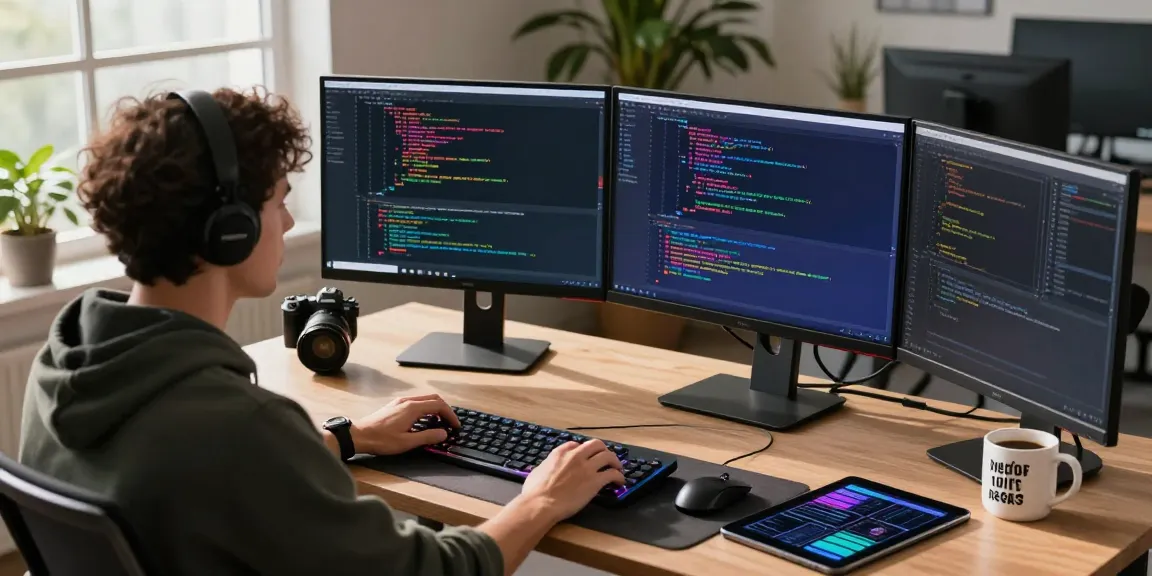
Many industries have benefited from the integration of multi-screen setups. For example, in the finance sector, traders often use multiple monitors to track various stock prices in real-time, analyze trends, and execute trades simultaneously. Similarly, software developers can run debugging programs on one screen while coding on another, leading to more efficient problem-solving. The versatility of a multi-screen desk display allows for tailored applications across diverse fields, making it an invaluable asset.
Setting Up Your Multi-Screen Desk Display
Transitioning to a multi-screen desk display requires careful planning and consideration to maximize its benefits. The setup process involves selecting the right monitors, ensuring optimal ergonomics, and acquiring necessary accessories to create a conducive work environment.
Selecting the Right Monitors for Your Needs
When choosing monitors for your multi-screen setup, consider factors such as screen size, resolution, and panel type. Larger screens with high resolutions are ideal for tasks requiring detailed visuals, such as video editing or graphic design. Additionally, opting for monitors with flexible mounting options can help create a more organized workspace.
Optimal Ergonomics and Workspace Layout
Ergonomics plays a crucial role in maintaining productivity and minimizing physical strain. Position your monitors at eye level and at an arm's length to reduce neck and eye strain. An L-shaped desk or adjustable monitor stands can help achieve an ergonomic layout that caters to your needs, enabling you to work comfortably for extended periods.
Essential Accessories for a Complete Setup
To optimize your multi-screen experience, consider investing in essential accessories. A high-quality monitor stand can save desk space, while cable management solutions keep your workspace tidy. Additionally, using a comfortable chair with good lumbar support ensures that you maintain posture while working across multiple screens.
Configuring Your Display Settings for Efficiency
Once your multi-screen setup is established, configuring the display settings is essential for optimal performance. Proper settings help ensure that each screen is utilized effectively, creating a cohesive workflow that enhances productivity.
Operating System and Software Configuration
Most operating systems, including Windows and macOS, support multi-screen configurations. Ensure that your displays are correctly recognized by the system and set to their native resolutions. Additionally, utilizing software tools such as DisplayFusion or Ultramon can help manage multiple displays more efficiently, allowing for custom hotkeys and taskbar settings.
Managing Screen Real Estate Effectively
Screen real estate management is crucial in a multi-screen setup. Organizing applications by categories can help users quickly locate tools they need. For instance, communication apps can be placed on one monitor while work-related software is on another, creating a logical flow that reduces cognitive overload.
Color Calibration and Resolution Settings
To ensure accuracy in color representation, particularly in creative fields, calibrating your monitors is vital. Tools like the Datacolor Spyder can help achieve consistent colors across screens. Additionally, adjusting resolution settings according to the specific requirements of your tasks can enhance visual clarity.
Best Practices for Multi-Screen Workflow Management
Adopting best practices for managing your multi-screen workspace is essential to fully realize its potential. Effective workflow management can further streamline operations and boost efficiency.
Task Prioritization and App Organization
Effective task prioritization is key when utilizing multiple monitors. Creating a to-do list and allocating specific applications to designated screens can help maintain focus. For example, keep project management tools on one monitor while conducting research on another, making it easier to stay organized.
Utilizing Keyboard Shortcuts for Speed
Mastering keyboard shortcuts can significantly boost your efficiency in a multi-screen environment. Familiarize yourself with shortcuts relevant to your operating system and the applications you use most frequently. This knowledge allows for quicker navigation between screens and reduces time lost in manual tasks.
Regular Maintenance and Updates for Optimal Performance
To ensure your multi-screen setup operates smoothly, conduct regular maintenance. Keep your software up to date and perform hardware checks to avoid any functional issues. Clearing out unused applications and tabs can also help maintain speed and efficiency.
Future Trends: Evolving Multi-Screen Technologies
As technology continues to advance, multi-screen displays are likely to evolve as well. Staying informed about emerging trends can enhance your workspace and productivity even further.
What’s Next in Multi-Screen Innovations?
Future innovations may include flexible displays that can be adjusted according to user preferences. Additionally, advancements in display technology may lead to monitors with enhanced color accuracy, refresh rates, and response times tailored for high-demand applications.
Integrating Artificial Intelligence into Your Workspace
AI integration is set to revolutionize the multi-screen experience. Intelligent software could automate tasks, allowing users to focus on higher-level responsibilities. For instance, AI could manage screen allocation based on task urgency, optimizing efficiency in real-time.
The Role of Virtual Reality in Future Displays
Virtual reality technology has the potential to reshape the concept of a multi-screen desk display. Imagine immersive work environments where multiple virtual screens can be configured according to personal preference, creating an expansive workspace that surpasses physical limitations.
What are the main advantages of using multiple screens?
The main advantages of using multiple screens include improved productivity, enhanced focus, and the ability to multitask more efficiently. Users can view more applications simultaneously without the need to constantly switch between tabs or windows, streamlining workflow significantly.
How can I improve my workspace ergonomics with a multi-screen setup?
Improving workspace ergonomics involves carefully positioning your monitors, using adjustable stands, and ensuring your chair and desk are set at the appropriate heights. This setup minimizes physical strain and promotes better posture, allowing for longer periods of comfortable work.
What accessories do I need for an effective multi-screen desk display?
Essential accessories for an effective multi-screen desk display include high-quality monitor stands, cable management solutions, and ergonomic chairs. Additionally, consider using docking stations or USB hubs to manage connections and peripherals efficiently.
What software can help manage multiple displays efficiently?
Software solutions such as DisplayFusion, Ultramon, and Microsoft PowerToys can significantly enhance your experience with multiple displays. These tools offer features like window management, screen splitting, and custom hotkeys to optimize workflow.
How do I troubleshoot common issues with multiple monitors?
Common troubleshooting steps include checking your connections, ensuring that graphics drivers are up to date, and verifying that the monitors are recognized by your operating system. If problems persist, consulting the manufacturer's support site may provide solutions tailored to specific hardware.